Focus event managerment
Posted: 05 Apr 2016, 10:08
Hi
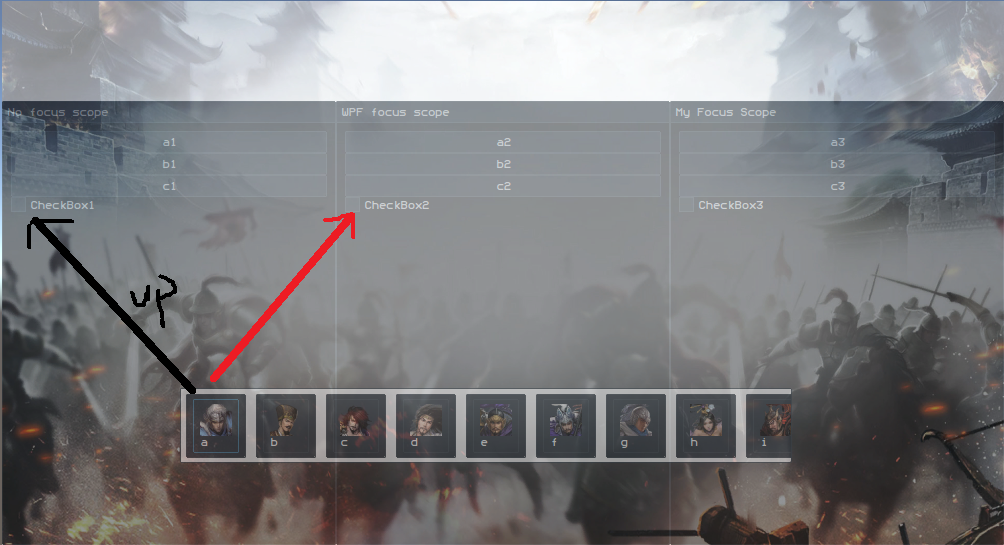
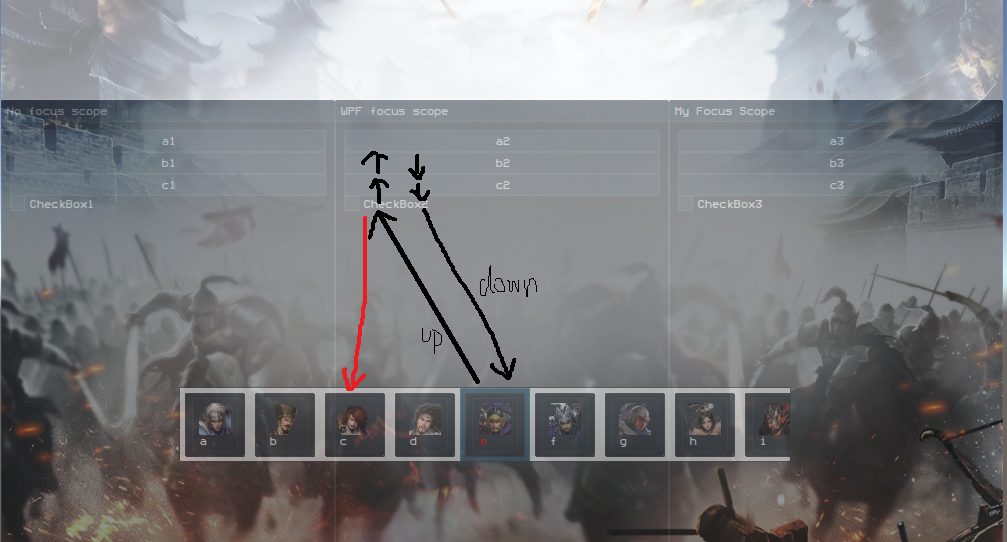
I have a user interface, there are three layers in horizontal, each layer has few buttons ,listbox and tabcontrol, i noticed that when changing focus using keyboard or remote control,the focus on each control was not expected as what i want, for example,when i move out from listbox which contains few buttons to another control,and back to the listbox,the focus was not set where it was,and the effect was different too. another example is how i just want to move the focus out into another control when i click up or down keyboard rather than click left or right keyboard until to the edge of the control, that is , i have a listbox which contains few buttons,above this listbox is a tabcontrol, when i scroll the listbox horizontally to the edge,the focus should not be out of the listbox,but when i press up button ,the focus should be moved to tabcontrol,so it is with the tabcontrol.
Do i need to write extra codes to manage the focus event so that the focus behaviour can be as what i describe above?
this is my ui code:
I appreciate your help, Thanks in advance. 
I have a user interface, there are three layers in horizontal, each layer has few buttons ,listbox and tabcontrol, i noticed that when changing focus using keyboard or remote control,the focus on each control was not expected as what i want, for example,when i move out from listbox which contains few buttons to another control,and back to the listbox,the focus was not set where it was,and the effect was different too. another example is how i just want to move the focus out into another control when i click up or down keyboard rather than click left or right keyboard until to the edge of the control, that is , i have a listbox which contains few buttons,above this listbox is a tabcontrol, when i scroll the listbox horizontally to the edge,the focus should not be out of the listbox,but when i press up button ,the focus should be moved to tabcontrol,so it is with the tabcontrol.
Do i need to write extra codes to manage the focus event so that the focus behaviour can be as what i describe above?
this is my ui code:
Code: Select all
<Grid
      x:Class="putaogamedemo.page1"
      xmlns="http://schemas.microsoft.com/winfx/2006/xaml/presentation"
      xmlns:x="http://schemas.microsoft.com/winfx/2006/xaml"
      xmlns:mc="http://schemas.openxmlformats.org/markup-compatibility/2006"
      xmlns:d="http://schemas.microsoft.com/expression/blend/2008"
      xmlns:local="clr-namespace:putaogamedemo"
      mc:Ignorable="d"
      xmlns:vm="clr-namespace:putaogame.ViewModels" >


    <Grid.Resources>
        <vm:MytabViewModel x:Key="MytabViewModel"></vm:MytabViewModel>
        <DataTemplate x:Key="ItemTemplate">
            <Button Content="{Binding}" Foreground="White" />
        </DataTemplate>

        <DataTemplate x:Key="SelectedTemplate">
            <Button Content="{Binding}" Foreground="Red" />
        </DataTemplate>

        <DataTemplate x:Key="UnSelectedTemplate">
            <Button Content="{Binding}" Foreground="White" />
        </DataTemplate>

        <Style TargetType="{x:Type ListBoxItem}" x:Key="ContainerStyle">
            <Setter Property="ContentTemplate" Value="{StaticResource ItemTemplate}" />
            <Style.Triggers>
                <Trigger Property="IsFocused" Value="True">
                    <Setter Property="ContentTemplate" Value="{StaticResource SelectedTemplate}" />
                </Trigger>
            </Style.Triggers>

        </Style>

        <Style TargetType="{x:Type Button}" x:Key="ContainerStyle1">
            <Setter Property="ContentTemplate" Value="{StaticResource ItemTemplate}" />
            <Style.Triggers>
                <Trigger Property="IsFocused" Value="True">
                    <Setter Property="ContentTemplate" Value="{StaticResource SelectedTemplate}" />
                </Trigger>

            </Style.Triggers>

        </Style>

    </Grid.Resources>

    <Viewbox Stretch="UniformToFill">
        <Grid>
            <Canvas Width="1820" Height="1080" Margin="-10,-10,10,10">
                <Image x:Name="SpaceBg" Source="bg1.jpg" Stretch="Fill" Height="1396" Width="2240" Canvas.Left="-251" Canvas.Top="-160">

                </Image>
            </Canvas>
            <!--<Canvas Width="1800" Height="1080">
                <Image x:Name="BigPlanet" Source="BigPlanet.png" Stretch="Fill" Height="1080" Width="800" Canvas.Left="990" Canvas.Top="85">

                </Image>
            </Canvas>
            <Canvas Width="1800" Height="1080">
                <Image x:Name="CloseUpPlanet" Source="CloseUpPlanet.png" Stretch="Fill"  Canvas.Right="0" Canvas.Bottom="0">

                </Image>
            </Canvas>-->
        </Grid>
    </Viewbox>

    <StackPanel Name="mypanel" Margin="100,10,10,10">

        <Grid HorizontalAlignment="Center" VerticalAlignment="Center" >


            <StackPanel Grid.Row="0" Grid.Column="0" Margin="-342,98,652,-314" RenderTransformOrigin="0.472,0.754" Width="492.19">
                <StackPanel.Background>
                    <ImageBrush ImageSource="bg2.jpg"/>
                </StackPanel.Background>
                <TextBlock Height="343.3" Opacity=".4" FontSize="30" Foreground="White" Background="#FF575723" Margin="15,18,15,16">
                    "I promised to love him and let him eat from my golden plate,
                    drink from my golden cup, and sleep on my golden bed."
                </TextBlock>
                <Button HorizontalAlignment="Stretch" VerticalAlignment="Bottom" Opacity=".5" Style="{StaticResource ContainerStyle1}" Content="setting" Margin="18,16,18,-100"/>
                <Button VerticalAlignment="Bottom" Opacity=".5" Style="{StaticResource ContainerStyle1}" Content="detail" BorderThickness="0" Margin="18,100,18,18"/>
            </StackPanel>


            <TabControl Grid.Row="0"
        		Width="690"

        		DataContext="{StaticResource MytabViewModel}"
        		TabStripPlacement="Right"
        		KeyboardNavigation.DirectionalNavigation="Continue"
        		ItemsSource="{Binding Mytab}" HorizontalAlignment="Left" Margin="374.19,98,0,-314">
                <TabControl.Resources>
                    <Style TargetType="TabItem">
                        <Setter Property="Template">
                            <Setter.Value>
                                <ControlTemplate TargetType="TabItem">
                                    <Border Name="Border" BorderThickness="1,1,1,0" BorderBrush="Gainsboro" CornerRadius="4,4,0,0" Margin="2,0">
                                        <ContentPresenter x:Name="ContentSite"
                                                          VerticalAlignment="Center"
                                                          HorizontalAlignment="Center"
                                                          ContentSource="Header"
                                                          Margin="10,2">

                                        </ContentPresenter>

                                    </Border>

                                    <ControlTemplate.Triggers>

                                        <Trigger Property="IsSelected" Value="True">
                                            <Setter TargetName="Border" Property="Background" Value="LightSkyBlue"></Setter>
                                        </Trigger>
                                        <Trigger Property="IsSelected" Value="False">
                                            <Setter TargetName="Border" Property="Background" Value="GhostWhite"></Setter>
                                        </Trigger>
                                    </ControlTemplate.Triggers>
                                </ControlTemplate>
                            </Setter.Value>
                        </Setter>
                    </Style>
                </TabControl.Resources>
                <TabControl.ItemTemplate>
                    <DataTemplate>
                        <TextBlock Text="{Binding Header}" Foreground="White" Background="Black" FontSize="10" />
                    </DataTemplate>
                </TabControl.ItemTemplate>
                <TabControl.ContentTemplate>
                    <DataTemplate>
                        <TextBlock Text="{Binding Content}" Foreground="White" Background="Black" FontSize="15" />
                    </DataTemplate>
                </TabControl.ContentTemplate>

            </TabControl>
        </Grid>
        <ListBox
                 SelectedItem="{Binding SelectedItem}"
                 KeyboardNavigation.DirectionalNavigation="Continue"
                 ItemContainerStyle="{StaticResource ContainerStyle}"
                 x:Name="listbox"
                     Margin="183,500,392,10"
                     Background="White"
                 Opacity=".5"
                 ScrollViewer.VerticalScrollBarVisibility="Hidden"
                 ScrollViewer.HorizontalScrollBarVisibility="Hidden"
                 ScrollViewer.CanContentScroll="True"

                VerticalAlignment="Bottom">
            <ListBox.ItemsPanel>
                <ItemsPanelTemplate>
                    <StackPanel Orientation="Horizontal"/>
                </ItemsPanelTemplate>
            </ListBox.ItemsPanel>
            <Button x:Name="button1"  >
                <StackPanel>
                    <Image Source="jiangwei.png"/>
                    <TextBlock><Run Text="jiangwei"/></TextBlock>
                </StackPanel>

            </Button>

            <Button x:Name="button2" >
                <!--<Button.Resources>
                    <Style TargetType="Button">
                        <Setter Property="BorderBrush" Value="Red"></Setter>
                        <Style.Triggers>
                            <Trigger Property="IsFocused" Value="True">
                                <Setter Property="BorderBrush" Value="WhiteSmoke"></Setter>
                            </Trigger>
                        </Style.Triggers>
                    </Style>
                </Button.Resources>-->
                <StackPanel>
                    <Image Source="xushu.png"/>
                    <TextBlock><Run Text="xushu"/></TextBlock>
                </StackPanel>
            </Button>
            <Button x:Name="button3" >
                <StackPanel>
                    <Image Source="yujin.png"/>
                    <TextBlock><Run Text="yujin"/></TextBlock>
                </StackPanel>
            </Button>
            <Button x:Name="button4" >
                <StackPanel>
                    <Image Source="yuzhenren.png"/>
                    <TextBlock><Run Text="yuzhenren"/></TextBlock>
                </StackPanel>
            </Button>
            <Button x:Name="button5" >
                <StackPanel>
                    <Image Source="zhanghe.png"/>
                    <TextBlock><Run Text="zhanghe"/></TextBlock>
                </StackPanel>
            </Button>
            <Button x:Name="button6" >
                <StackPanel>
                    <Image Source="zhangliao.png"/>
                    <TextBlock><Run Text="zhangliao"/></TextBlock>
                </StackPanel>
            </Button>
            <Button x:Name="button7" >
                <StackPanel>
                    <Image Source="zhaoyun.png"/>
                    <TextBlock><Run Text="zhaoyun"/></TextBlock>
                </StackPanel>
            </Button>
            <Button x:Name="button8" >
                <StackPanel>
                    <Image Source="zhenmi.png"/>
                    <TextBlock><Run Text="zhenmi"/></TextBlock>
                </StackPanel>
            </Button>
            <Button x:Name="button9" >
                <StackPanel>
                    <Image Source="zhoutai.png"/>
                    <TextBlock><Run Text="zhoutai"/></TextBlock>
                </StackPanel>
            </Button>
            <Button x:Name="button10" >
                <StackPanel>
                    <Image Source="zhouyu.png"/>
                    <TextBlock><Run Text="zhouyu"/></TextBlock>
                </StackPanel>
            </Button>
            <Button x:Name="button11" >
                <StackPanel>
                    <Image Source="zhujue.png"/>
                    <TextBlock><Run Text="zhujue"/></TextBlock>
                </StackPanel>
            </Button>
            <Button x:Name="button12" >
                <StackPanel>
                    <Image Source="sunce.png"/>
                    <TextBlock><Run Text="sunce"/></TextBlock>
                </StackPanel>
            </Button>
        </ListBox>
    </StackPanel>
</Grid>