Custom effect resets CompositeTransform (Unity6/HDRP)
Posted: 04 Dec 2024, 17:46
Hi there, enjoying another awesome day with Noesis here, just came across something strange.
I added a TextBlock to one of my HUD controls and added a CompositeTransform to it. That control is then added to my main view as are many others. The transform works perfectly, I tested all resolutions my screens are able to run on. As soon as I add an effect to that control the transform is kinda broken or reset. In this case I used a custom tint effect but it also happens with the builtin blur effect and interestingly also happens when no effect is added but an opacity value is specified.
The transform is applied such way:
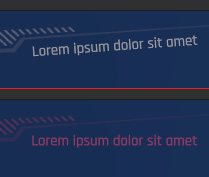
The upper image shows the working transform, the lower one the result after applying the tint effect. The effect class derives from Noesis.ShaderEffect and just holds a color property. The shader is pretty simple as well:
The same also happens when I add a wrapping grid and apply the effect to it instead of the HUD control.
Why is that happening, am I doing anything wrong?
I'm more than happy to hear any proposal.
I added a TextBlock to one of my HUD controls and added a CompositeTransform to it. That control is then added to my main view as are many others. The transform works perfectly, I tested all resolutions my screens are able to run on. As soon as I add an effect to that control the transform is kinda broken or reset. In this case I used a custom tint effect but it also happens with the builtin blur effect and interestingly also happens when no effect is added but an opacity value is specified.
The transform is applied such way:
Code: Select all
<Canvas HorizontalAlignment="Right" VerticalAlignment="Bottom" Margin="0 0 930 60">
    <Grid>
        <noesis:Element.Transform3D>
            <noesis:CompositeTransform3D  RotationZ="4.0" />
        </noesis:Element.Transform3D>
        <TextBlock Foreground="White" HorizontalAlignment="Left" TextAlignment="Left" FontFamily="../Fonts/#Rajdhani" FontWeight="Medium" FontSize="32">
            <Run Text="Lorem ipsum dolor sit amet" Foreground="#55FFFFFF" />
        </TextBlock>
    </Grid>
</Canvas>
The upper image shows the working transform, the lower one the result after applying the tint effect. The effect class derives from Noesis.ShaderEffect and just holds a color property. The shader is pretty simple as well:
Code: Select all
#include "EffectHelpers.h"

uniforms
{
    fixed4 _color;
};

fixed4 main_effect()
{
    fixed4 c = GetInput();

    return float4
    (
        c.r * _color.r,
        c.g * _color.g,
        c.b * _color.b,
        c.a
    );
}Why is that happening, am I doing anything wrong?
I'm more than happy to hear any proposal.