


Custom effect resets CompositeTransform (Unity6/HDRP)
Hi there, enjoying another awesome day with Noesis here, just came across something strange.
I added a TextBlock to one of my HUD controls and added a CompositeTransform to it. That control is then added to my main view as are many others. The transform works perfectly, I tested all resolutions my screens are able to run on. As soon as I add an effect to that control the transform is kinda broken or reset. In this case I used a custom tint effect but it also happens with the builtin blur effect and interestingly also happens when no effect is added but an opacity value is specified.
The transform is applied such way:
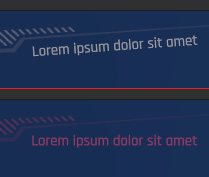
The upper image shows the working transform, the lower one the result after applying the tint effect. The effect class derives from Noesis.ShaderEffect and just holds a color property. The shader is pretty simple as well:
The same also happens when I add a wrapping grid and apply the effect to it instead of the HUD control.
Why is that happening, am I doing anything wrong?
I'm more than happy to hear any proposal.
I added a TextBlock to one of my HUD controls and added a CompositeTransform to it. That control is then added to my main view as are many others. The transform works perfectly, I tested all resolutions my screens are able to run on. As soon as I add an effect to that control the transform is kinda broken or reset. In this case I used a custom tint effect but it also happens with the builtin blur effect and interestingly also happens when no effect is added but an opacity value is specified.
The transform is applied such way:
Code: Select all
<Canvas HorizontalAlignment="Right" VerticalAlignment="Bottom" Margin="0 0 930 60">
    <Grid>
        <noesis:Element.Transform3D>
            <noesis:CompositeTransform3D  RotationZ="4.0" />
        </noesis:Element.Transform3D>
        <TextBlock Foreground="White" HorizontalAlignment="Left" TextAlignment="Left" FontFamily="../Fonts/#Rajdhani" FontWeight="Medium" FontSize="32">
            <Run Text="Lorem ipsum dolor sit amet" Foreground="#55FFFFFF" />
        </TextBlock>
    </Grid>
</Canvas>
The upper image shows the working transform, the lower one the result after applying the tint effect. The effect class derives from Noesis.ShaderEffect and just holds a color property. The shader is pretty simple as well:
Code: Select all
#include "EffectHelpers.h"

uniforms
{
    fixed4 _color;
};

fixed4 main_effect()
{
    fixed4 c = GetInput();

    return float4
    (
        c.r * _color.r,
        c.g * _color.g,
        c.b * _color.b,
        c.a
    );
}Why is that happening, am I doing anything wrong?
I'm more than happy to hear any proposal.
-

-
sfernandez
Site Admin
- Posts: 3363
- Joined:
Re: Custom effect resets CompositeTransform (Unity6/HDRP)
This is due to how effects and opacity groups are generated.
When an element of the tree has an effect specified or an opacity set, that whole subtree is rendered to an offscreen texture to generate such effect or composite the subtree so the opacity can be correctly applied. This means that any 3D transformation inside the subtree makes no sense, as everthing is rendered to a plain texture and we disable 3D transforms in that case.
So if you want to apply any effect or opacity change, it should be done inside the element that defines the 3D transform:
Would that work for you?
When an element of the tree has an effect specified or an opacity set, that whole subtree is rendered to an offscreen texture to generate such effect or composite the subtree so the opacity can be correctly applied. This means that any 3D transformation inside the subtree makes no sense, as everthing is rendered to a plain texture and we disable 3D transforms in that case.
So if you want to apply any effect or opacity change, it should be done inside the element that defines the 3D transform:
Code: Select all
<Grid>
  <noesis:Element.Transform3D>
    <noesis:CompositeTransform3D RotationY="5"/>
  </noesis:Element.Transform3D>
  <Border>
    <Border.Effect>
      <BlurEffect/>
    </Border.Effect>
    ...
  </Border>
</Grid>Re: Custom effect resets CompositeTransform (Unity6/HDRP)
Thanks a bunch for the explanation, now I understand the reason why this is happening.
The way you proposed works but requires some major rework on the HUD elements. When the game falls into certain states some parts of the GUI should apply a tint effect. I tried adding the effect to those components in the main view before but now I'm gonna move the effects directly into the controls and bind their internal colors to the state. It'll be some additional work but way more important is that it works.
Would having multiple separate effects strain rendering performance more than using a single one, like I had before?
The way you proposed works but requires some major rework on the HUD elements. When the game falls into certain states some parts of the GUI should apply a tint effect. I tried adding the effect to those components in the main view before but now I'm gonna move the effects directly into the controls and bind their internal colors to the state. It'll be some additional work but way more important is that it works.
Would having multiple separate effects strain rendering performance more than using a single one, like I had before?
-
-
sfernandez
Site Admin
- Posts: 3363
- Joined:
Re: Custom effect resets CompositeTransform (Unity6/HDRP)
Not necessarily, as it will affect smaller parts. In some cases it could be even better, for example if you have only a few UI components in the whole screen that occupy a small amount of pixels.Would having multiple separate effects strain rendering performance more than using a single one, like I had before?
Re: Custom effect resets CompositeTransform (Unity6/HDRP)
Alright, I'm gonna optimize my controls accordingly. Thanks a lot for your feedback.Not necessarily, as it will affect smaller parts. In some cases it could be even better, for example if you have only a few UI components in the whole screen that occupy a small amount of pixels.Would having multiple separate effects strain rendering performance more than using a single one, like I had before?
Who is online
Users browsing this forum: Baidu [Spider] and 6 guests