

Multi Display app in Unity
Hi,
I'm working an app that have multiple UIs, each displayed on different window/monitor. I'm trying to use Noesis for that - but seems like app is getting a proper mouse input from main display only.
Can Noesis be used in Unity on multiple displays?
I'm working an app that have multiple UIs, each displayed on different window/monitor. I'm trying to use Noesis for that - but seems like app is getting a proper mouse input from main display only.
Can Noesis be used in Unity on multiple displays?

Re: Multi Display app in Unity
Yes, it should but this is something we probably never verified in Unity. You are talking about a single window that spans several monitors right?
Re: Multi Display app in Unity
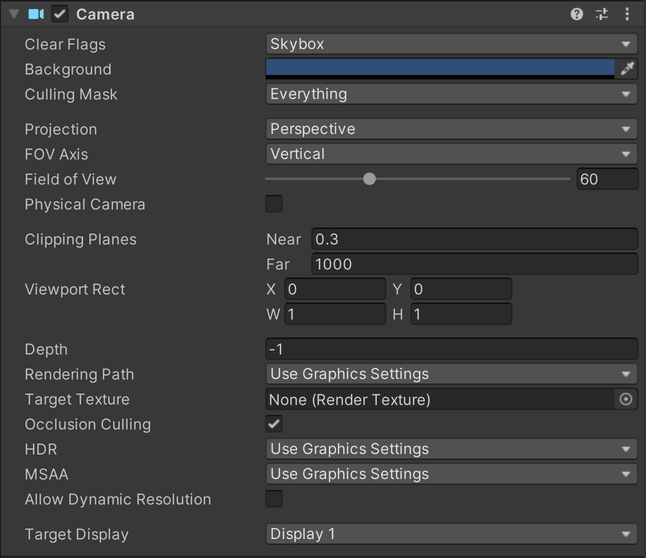
No, I mean the app that has multiple windows, each with own camera (Target Display setting at the bottom of the image below)You are talking about a single window that spans several monitors right?
-

-
sfernandez
Site Admin
- Posts: 3364
- Joined:
Re: Multi Display app in Unity
Are you using the Camera Overlay mode or the Render Texture mode?
We use UnityEngine.Event.mousePosition and UnityEngine.Screen.height information to calculate the coordinates inside the screen.
You can see the script code at Assets/NoesisGUI/Plugins/NoesisView.cs : ProjectPointer method.
Could you please print the values that are received from Display2 in the ev.mousePosition, and also the Screen dimensions?
Thanks for your feedback.
We use UnityEngine.Event.mousePosition and UnityEngine.Screen.height information to calculate the coordinates inside the screen.
You can see the script code at Assets/NoesisGUI/Plugins/NoesisView.cs : ProjectPointer method.
Could you please print the values that are received from Display2 in the ev.mousePosition, and also the Screen dimensions?
Thanks for your feedback.
-

- TheHappyYachter
- Posts: 4
- Joined:
Re: Multi Display app in Unity
Apologies for the extreme thread Necro.
We have been looking at adding multiple screen capability to our game as described here, the answer to the question that was asked is that the coordinates obtained from Display 2 start at 0,0 at the top left corner of the screen.
Screen.height and Screen.width return in accordance with Display.activeEditorGameViewTarget.
When moving the mouse around (in editor) after clicking the Display 1 window you see the following while over Display 1 Local Position = (374.8118, -223.682), Active Display = 0, Noesis Position = (374.8118, 1303.682), Screen = (1920, 1080) Over Display 2 you see Local Position = (3330.125, 250.795), Active Display = 0, Noesis Position = (3330.125, 829.205), Screen = (1920, 1080)
If you then click in Display 2 you see Local Position = (331, 99), Active Display = 1, Noesis Position = (331, 620), Screen = (1359, 719)
The logging is generated as
We have been looking at adding multiple screen capability to our game as described here, the answer to the question that was asked is that the coordinates obtained from Display 2 start at 0,0 at the top left corner of the screen.
Screen.height and Screen.width return in accordance with Display.activeEditorGameViewTarget.
When moving the mouse around (in editor) after clicking the Display 1 window you see the following while over Display 1 Local Position = (374.8118, -223.682), Active Display = 0, Noesis Position = (374.8118, 1303.682), Screen = (1920, 1080) Over Display 2 you see Local Position = (3330.125, 250.795), Active Display = 0, Noesis Position = (3330.125, 829.205), Screen = (1920, 1080)
If you then click in Display 2 you see Local Position = (331, 99), Active Display = 1, Noesis Position = (331, 620), Screen = (1359, 719)
The logging is generated as
Code: Select all
    private UnityEngine.Vector2 ProjectPointer(float x, float y)
    {
        if (_camera != null)
        {
#if UNITY_EDITOR
      var d = Display.activeEditorGameViewTarget;
#else
      var d = Display.RelativeMouseAt(Input.mousePosition).z;
#endif
      Debug.Log($"Local Position = ({x}, {y}), Active Display = {d}, Noesis Position = ({x}, {UnityEngine.Screen.height - y}), Screen = ({UnityEngine.Screen.width}, {UnityEngine.Screen.height})");
            return new UnityEngine.Vector2(x, UnityEngine.Screen.height - y);
        }
        else if (_texture != null) { ... }
        return Vector2.zero;
}Re: Multi Display app in Unity
Sorry for the delayed response.
I need to better understand the scenario. As far as I know, you have two cameras with two Noesis views, each attached to a different monitor, correct? So a repro case would be two XAMLs, each with a button, one per view, and you should be able to click both buttons (each displayed on a different monitor).
Is that accurate?
I need to better understand the scenario. As far as I know, you have two cameras with two Noesis views, each attached to a different monitor, correct? So a repro case would be two XAMLs, each with a button, one per view, and you should be able to click both buttons (each displayed on a different monitor).
Is that accurate?
-
- TheHappyYachter
- Posts: 4
- Joined:
Re: Multi Display app in Unity
Quite alright, especially as I have done the same back (note to self to click the Notify me button!)
Thats correct, two cameras each set to a different Display. Each has a NoesisView component attached with a simple XAML with a button. Both buttons should be clickable and should highlight when mousing over.
It looks to me like the position sensing logic that picks up what the mouse is over is not sensitive to the Screen/Display.
Thats correct, two cameras each set to a different Display. Each has a NoesisView component attached with a simple XAML with a button. Both buttons should be clickable and should highlight when mousing over.
It looks to me like the position sensing logic that picks up what the mouse is over is not sensitive to the Screen/Display.
Re: Multi Display app in Unity
Could you please create a ticket for this? Thank you
Who is online
Users browsing this forum: No registered users and 5 guests