
🌍 Localization Tutorial

NoesisGUI provides two features which allow you to easily localize text and resources in your XAML documents:
- LocExtension allows you to retrieve resources from a locale ResourceDictionary.
- RichText enables the use of BBCode and data binding in your strings.
LocExtension
LocExtension works in three parts:
- The Source attached property sets the Uri of a localized ResourceDictionary.
- The LocExtension markup extension provides a value for any XAML property attribute by looking up a reference in the ResourceDictionary defined by the Source attached property.
- If the Source attached property changes, LocExtension values will be re-evaluated using the new ResourceDictionary.
Lets look at an example of this in action. This is the contents of a "Language_en-us.xaml" localized ResourceDictionary:
 <ResourceDictionary
   xmlns="http://schemas.microsoft.com/winfx/2006/xaml/presentation"
   xmlns:x="http://schemas.microsoft.com/winfx/2006/xaml"
   xmlns:sys="clr-namespace:System;assembly=mscorlib">
   <ImageBrush x:Key="Flag" ImageSource="Flag_en-gb.png" Stretch="Fill"/>
   <sys:String x:Key="TitleLabel">LOCALIZATION SAMPLE</sys:String>
   <sys:String x:Key="DescLabel">
     There are many ways to implement localization in NoesisGUI. In this example we are using our Loc markup extension,
     which references resources in a local ResourceDictionary. The desired language dictionary is selected in the root
     DataContext. The RichText attached property for TextBlocks allows you to use BBCode markup in your text. It
     supports text formatting, images, and bindings to the DataContext.
   </sys:String>
 </ResourceDictionary>
And this is a XAML document which has the Loc.Source set to Language_en-us.xaml:
<StackPanel
  xmlns="http://schemas.microsoft.com/winfx/2006/xaml/presentation"
  xmlns:noesis="clr-namespace:NoesisGUIExtensions;assembly=Noesis.GUI.Extensions"
  noesis:Loc.Source="Language_en-us.xaml">
  <Border Background="{noesis:Loc Flag}">
    <TextBlock Text="{noesis:Loc TitleLabel}"/>
  </Border>
  <TextBlock Text="{noesis:Loc DescLabel}"/>
</StackPanel>

In the above example, the LocExtension is providing values from the Loc.Source ResourceDictionary Language_en-us.xaml using the keys Flag, TitleLabel, and DescLabel. If we were to change Loc.Source to another ResourceDictionary, one localized to a different locale, these values would automatically update.
NOTE
LocExtension can be used to localize any type of resource. This includes more complex items like ControlTemplate and Style, you can use this feature to change the styling and layout of your UI based on locale.
RichText
The RichText attached property formats BBCode markup into TextBlock Inlines.
<Grid
  xmlns="http://schemas.microsoft.com/winfx/2006/xaml/presentation"
  xmlns:noesis="clr-namespace:NoesisGUIExtensions;assembly=Noesis.GUI.Extensions">
  <TextBlock noesis:RichText.Text="
    There are [i]many[/i] ways to implement localization in [style=ColoredText]NoesisGUI[/style]."/>
</Grid>

As well as allowing you to style your text, RichText supports binding to the DataContext using the bind tag. This is a powerful addition to your localization toolset:
<Grid
  xmlns="http://schemas.microsoft.com/winfx/2006/xaml/presentation"
  xmlns:noesis="clr-namespace:NoesisGUIExtensions;assembly=Noesis.GUI.Extensions"
  xmlns:local="clr-namespace:MyGame">
  <Grid.DataContext>
    <local:MyViewModel MusicLevel="66" />
  </Grid.DataContext>
  <TextBlock noesis:RichText.Text="
    It supports text formatting, images, and bindings to the [i]DataContext[/i]
    (e.g. the music level is [color=LawnGreen][bind format='{0:0}%']MusicLevel[/bind][/color])."/>
</Grid>

LocExtension with RichText
When combined with LocExtension, RichText allows you to use BBCode in your localized strings. Here is the LocExtension example again, this time enhanced using RichText:
 <ResourceDictionary
   xmlns="http://schemas.microsoft.com/winfx/2006/xaml/presentation"
   xmlns:x="http://schemas.microsoft.com/winfx/2006/xaml"
   xmlns:sys="clr-namespace:System;assembly=mscorlib">
   <ImageBrush x:Key="Flag" ImageSource="Flag_en-gb.png" Stretch="Fill"/>
   <sys:String x:Key="TitleLabel">[b]LOCALIZATION SAMPLE[/b]</sys:String>
   <sys:String x:Key="DescLabel">
     There are [i]many[/i] ways to implement localization in [style=ColoredText]NoesisGUI[/style]. In this example
     we are using our [style=ColoredText][i]Loc[/i][/style] markup extension, which references resources in a local
     [i]ResourceDictionary[/i]. The desired language dictionary is selected in the root [i]DataContext[/i]. The
     [style=ColoredText][i]RichText[/i][/style] attached property for [i]TextBlocks[/i] allows you to use BBCode
     markup in your text. It supports text formatting, images, and bindings to the [i]DataContext[/i] (e.g. the
     music level is [color=LawnGreen][bind format='{0:0}%']MusicLevel[/bind][/color]).
   </sys:String>
 </ResourceDictionary>
<StackPanel
  xmlns="http://schemas.microsoft.com/winfx/2006/xaml/presentation"
  xmlns:noesis="clr-namespace:NoesisGUIExtensions;assembly=Noesis.GUI.Extensions"
  xmlns:local="clr-namespace:MyApp"
  noesis:Loc.Source="Language_en-us.xaml">
  <StackPanel.DataContext>
    <local:MyViewModel MusicLevel="80" />
  </StackPanel.DataContext>
  <Border Background="{noesis:Loc Flag}">
    <TextBlock noesis:RichText.Text="{noesis:Loc TitleLabel}"/>
  </Border>
  <TextBlock noesis:RichText.Text="{noesis:Loc DescLabel}"/>
</StackPanel>

Unreal Engine
Unreal RichText
In Unreal the RichText attached property uses an Unreal-style markup syntax.
Each markup tag name is used as Style resource key. If a Style resource is found with this key, an element of the Style TargetType will be created with that Style set to it. If the TargetType is not an Inline, then the new element is wrapped in an InlineUIContainer.
If a TargetType ContentControl is used, and the tag has content, this content will be applied to ContentControl.Content.
For cross-compatiblility with Unreal RichText, an img markup tag is provided. This will generate an Image contained in an InlineUIContainer, with it's Style set to the resource key supplied by the id parameter.
NOTE
This example uses the following runtime DataContext:
DescLabel: "There are <ItalicText>many</> ways to implement <ColoredText>localization</> in <NoesisLogo/> <RoundCorner>NoesisGUI</>."
<Grid
  xmlns="http://schemas.microsoft.com/winfx/2006/xaml/presentation"
  xmlns:noesis="clr-namespace:NoesisGUIExtensions;assembly=Noesis.GUI.Extensions">
  <Grid.Resources>
    <Style x:Key="ItalicText" TargetType="{x:Type Inline}">
      <Setter Property="FontStyle" Value="Italic"/>
    </Style>
    <Style x:Key="ColoredText" TargetType="{x:Type Inline}">
      <Setter Property="Foreground" Value="#FF2AA6E2"/>
      <Setter Property="FontWeight" Value="Bold"/>
    </Style>
    <Style x:Key="NoesisLogo" TargetType="{x:Type Image}">
      <Setter Property="Source" Value="logo.png"/>
      <Setter Property="Width" Value="32"/>
      <Setter Property="Height" Value="32"/>
    </Style>
    <Style x:Key="RoundCorner" TargetType="ContentControl">
      <Setter Property="Background" Value="#FF2AA6E2"/>
      <Setter Property="Template">
        <Setter.Value>
          <ControlTemplate TargetType="ContentControl">
            <Border Background="{TemplateBinding Background}" CornerRadius="4">
              <ContentPresenter Margin="4,2,4,0"/>
            </Border>
          </ControlTemplate>
        </Setter.Value>
      </Setter>
    </Style>
  </Grid.Resources>
  <TextBlock noesis:RichText.Text="{Binding DescLabel}" TextAlignment="Center"/>
</Grid>

LocTableExtension
NoesisGUI allows you to use Unreal's native localization system in your XAML documents using the LocTable markup extension.
Equivalent to using LOCTABLE in C++ code, LocTableExtension provides access to a localized text with the given Key in a StringTable. The table Id can be specified as an attached property in any parent container and it will be inherited down the tree, or you can set it locally in the markup extension itself. When using this markup extension we recommend to include the Source text so Microsoft Blend can show it in the designer view.
 {
   "FormatVersion": 2,
   "Namespace": "",
   "Subnamespaces": [
     {
       "Namespace": "LocalizeTable",
       "Children": [
         {
           "Source":
           {
             "Text": "LOCALIZATION SAMPLE"
           },
           "Translation":
           {
             "Text": "LOCALIZATION SAMPLE"
           },
           "Key": "TitleLabel"
         },
         {
           "Source":
           {
             "Text": "There are <ItalicText>many</> ways to implement localization in <ColoredText>NoesisGUI</>. In this \
                      example we are using our <ColoredItalicText>LocTable</> markup extension to integrate with Unreal \
                      localization system where we defined localized texts for each label. Each time the language is \
                      changed, the displayed text is updated accordingly. The <ColoredItalicText>RichText</> attached \
                      property for <ItalicText>TextBlocks</> allows you to use Unreal styles and images in your text."
           },
           "Translation":
           {
             "Text": "There are <ItalicText>many</> ways to implement localization in <ColoredText>NoesisGUI</>. In this \
                      example we are using our <ColoredItalicText>LocTable</> markup extension to integrate with Unreal \
                      localization system where we defined localized texts for each label. Each time the language is \
                      changed, the displayed text is updated accordingly. The <ColoredItalicText>RichText</> attached \
                      property for <ItalicText>TextBlocks</> allows you to use Unreal styles and images in your text."
           },
           "Key": "DescLabel"
         }
       ]
     }
   ]
 }
<StackPanel
  xmlns="http://schemas.microsoft.com/winfx/2006/xaml/presentation"
  xmlns:noesis="clr-namespace:NoesisGUIExtensions;assembly=Noesis.GUI.Extensions"
  noesis:LocTable.Id="GameTableId">
  <StackPanel.Resources>
    <Style x:Key="ItalicText" TargetType="{x:Type Inline}">
      <Setter Property="FontStyle" Value="Italic"/>
    </Style>
    <Style x:Key="ColoredText" TargetType="{x:Type Inline}">
      <Setter Property="Foreground" Value="#FF2AA6E2"/>
      <Setter Property="FontWeight" Value="Bold"/>
    </Style>
  </StackPanel.Resources>
  <Border Background="{noesis:Loc Flag}">
    <TextBlock noesis:RichText.Text="{noesis:LocTable 'LOCALIZATION SAMPLE', Key=TitleLabel}"/>
  </Border>
  <TextBlock noesis:RichText.Text="
    {noesis:LocTable 'There are many ways to implement localization in NoesisGUI. In this example we are using Unreal
     localization system through our custom markup extensions. Each language is defined in Unreal using Localization
     Dashboard specifying localized texts for each entry. The desired language is selected in the DataContext. Each
     time the language is changed, the displayed text is updated accordingly.', Key=DescLabel}"/>
</StackPanel>

Bindings
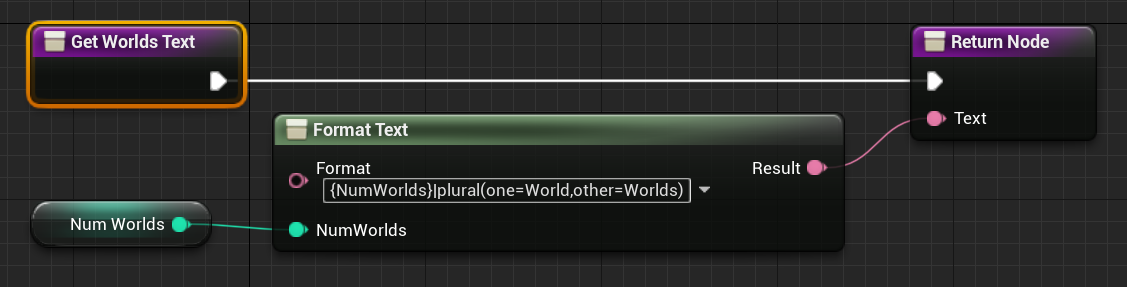
If you need to show localized text in XAML that is dynamic or is formatted from some parameters you can expose FText properties in your DataContext and Noesis will keep track of them to automatically notify when language is changed in Unreal.
<Grid
  xmlns="http://schemas.microsoft.com/winfx/2006/xaml/presentation"
  xmlns:x="http://schemas.microsoft.com/winfx/2006/xaml">
  <TextBlock Text="{Binding WorldsText}"/>
</Grid>
Localization Sample
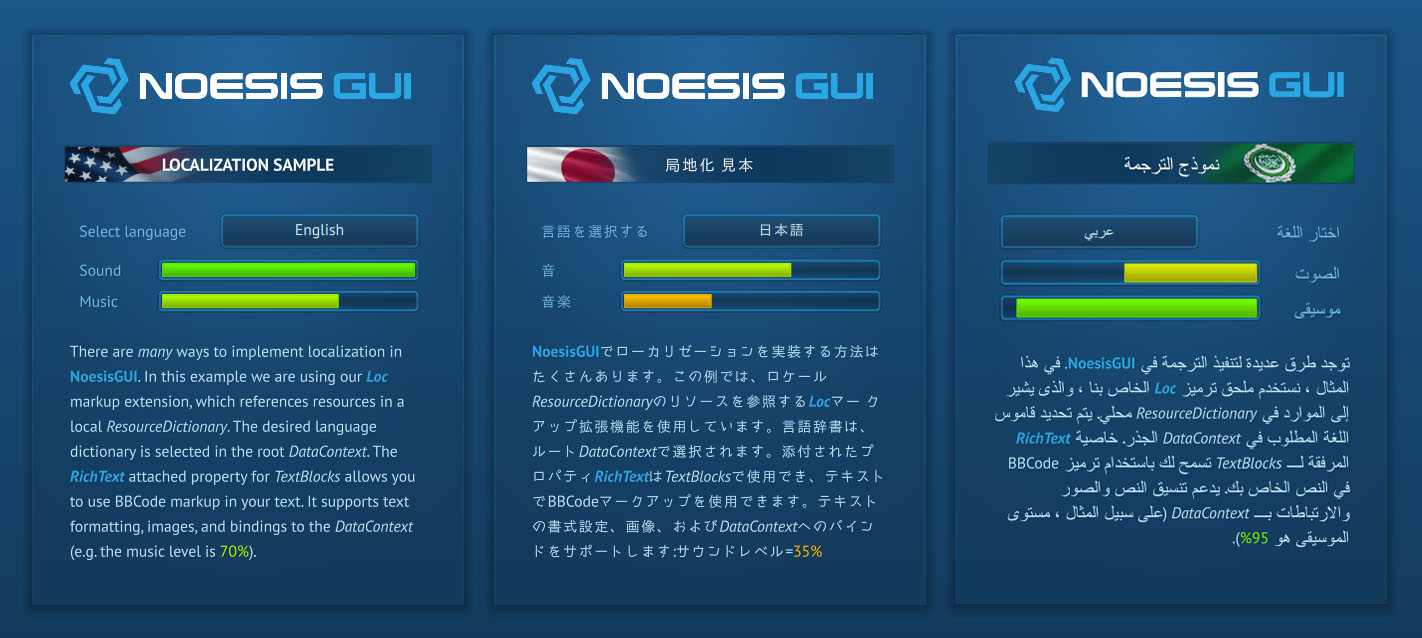
Our Localization Sample shows LocExtension and RichText in use.
Each language's resources are stored in a localized ResourceDictionary. The Loc.Source attached property binds to the SelectedLanguage in the root DataContext. SelectedLanguage is changed using a ComboBox, which binds to the Languages collection as it's ItemsSource.