


External event routing into Noesis
I've got some external events happening in my game that I want to route to the UI so it has a chance to respond to them (ie, trigger a storyboard, change visual states, etc). I was experimenting with putting a and on my main window. That worked great for event handling on the main window itself, but it's not working if I want to listen to those same events in child user controls. In a child control I tried to add myself as a listener of the routed event on the parent window but it didn't work; maybe i just don't know the proper syntax to do this binding..
Or maybe there is a better way to do this? It seems like was maybe made more for events originating from the controls themselves, not from an external source (like my game). Suggestions on the best way to handle this?
Code: Select all
RoutedEventCode: Select all
RoutedEventHandlerOr maybe there is a better way to do this? It seems like
Code: Select all
RoutedEvent-

-
sfernandez
Site Admin
- Posts: 3364
- Joined:
Re: External event routing into Noesis
Hi Sam,
Routed events traverse the visual tree from the root down to the element raising the event (Tunneling strategy) or it goes from the element raising the event up to the root (Bubbling strategy).
For example, if you have the following visual tree and the leaf element #2 is a TextBox with the focus, when you press a key the TextBox itself will raise 2 events: PreviewKeyDown and KeyDown, which will traverse the tree like this:
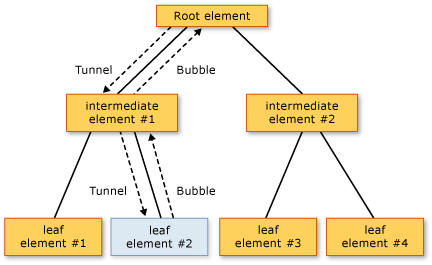
The order of routed events processing is as follows:
Routed events traverse the visual tree from the root down to the element raising the event (Tunneling strategy) or it goes from the element raising the event up to the root (Bubbling strategy).
For example, if you have the following visual tree and the leaf element #2 is a TextBox with the focus, when you press a key the TextBox itself will raise 2 events: PreviewKeyDown and KeyDown, which will traverse the tree like this:
The order of routed events processing is as follows:
- PreviewKeyDown (tunnel) on root element.
- PreviewKeyDown (tunnel) on intermediate element #1.
- PreviewKeyDown (tunnel) on source focused element #2.
- KeyDown (bubble) on source focused element #2.
- KeyDown (bubble) on intermediate element #1.
- KeyDown (bubble) on root element.
Code: Select all
Keyboard.FocusedElement.RaiseEvent(MyWindowEvent);Re: External event routing into Noesis
Unfortunately, it's more complicated than just the active control -- neither bubbling or tunneling will work in this case. I want any controls in my main window to respond to gameplay events. It sounds like RoutedEvent will just not work.
Some examples of how I might use this:
- there is a timer, and specific moments in the countdown, we want the UI to pop (flashes/shakes/etc)
- player hits low health, we want to pop out some controls (flashes/shakes/etc) and de-emphasize others for a moment
- player scores a critical hit, we want to pop some controls on the UI (flashes/shakes/etc)
Maybe a better way to do this is to add a counter to the data model that represents the "event" count? ie, on my root data model add fields like:
int gameTimerEvent
int lowHealthEvent
int criticalHitEvent
and then just observe changes on those events to kick the controls?
thanks for the help,
sam
Some examples of how I might use this:
- there is a timer, and specific moments in the countdown, we want the UI to pop (flashes/shakes/etc)
- player hits low health, we want to pop out some controls (flashes/shakes/etc) and de-emphasize others for a moment
- player scores a critical hit, we want to pop some controls on the UI (flashes/shakes/etc)
Maybe a better way to do this is to add a counter to the data model that represents the "event" count? ie, on my root data model add fields like:
int gameTimerEvent
int lowHealthEvent
int criticalHitEvent
and then just observe changes on those events to kick the controls?
thanks for the help,
sam
-
-
sfernandez
Site Admin
- Posts: 3364
- Joined:
Re: External event routing into Noesis
Ok, that sounds to me more like a ViewModel event, and UI listening to that event through an interactivity DataEventTrigger:
You can define one or more events in your view model and raise them whenever you want. And in xaml you will add DataEventTriggers to fire actions in response, for example a ControlStoryboardAction to fire an animation.
Is this what you are looking for?
Code: Select all
 <Grid
   xmlns="http://schemas.microsoft.com/winfx/2006/xaml/presentation"
   xmlns:x="http://schemas.microsoft.com/winfx/2006/xaml"
   xmlns:i="http://schemas.microsoft.com/expression/2010/interactivity"
   xmlns:ei="http://schemas.microsoft.com/expression/2010/interactions"
   xmlns:noesis="clr-namespace:NoesisGUIExtensions;assembly=Noesis.GUI.Extensions">
  <TextBlock Text="Download Finished!" Visibility="Collapsed">
    <i:Interaction.Triggers>
      <noesis:DataEventTrigger Source="{Binding}" EventName="DownloadFinished">
        <ei:ChangePropertyAction PropertyName="Visibility" Value="Visible"/>
      </noesis:DataEventTrigger>
    </i:Interaction.Triggers>
  </TextBlock>
</Grid>Is this what you are looking for?
Re: External event routing into Noesis
YES! I think that's what I'm looking for! Thank you so much for the help.
sam
sam
Re: External event routing into Noesis
I've attempted to reproduce the small example using DataEventTrigger but Unity is giving me an error: "Unknown type 'NoesisGUIExtensions.DataEventTrigger'" -- any ideas what might cause that? I made sure that this line is in my user control:
xmlns:noesis="clr-namespace:NoesisGUIExtensions;assembly=Noesis.GUI.Extensions"
hmmm.
xmlns:noesis="clr-namespace:NoesisGUIExtensions;assembly=Noesis.GUI.Extensions"
hmmm.
Re: External event routing into Noesis
Ah, looks like I'm just not on the right version of noesis. sorry!
sam
sam
Who is online
Users browsing this forum: No registered users and 11 guests